
Metode Pembayaran
langzhichina.com memudahkan Anda membayar pesanan dengan menyediakan berbagai pilihan pembayaran yang nyaman.
Syarat pembayaran apa yang diterima langzhichina.com?
PayPal: Saat Anda membayar melalui keranjang belanja dan memilih PayPal sebagai metode pembayaran, Anda akan diarahkan ke PayPal melalui koneksi daring aman tempat Anda dapat menyelesaikan pesanan dan pembayaran.
Kartu Kredit: Kami menerima semua kartu kredit utama termasuk Visa, Mastercard, American Express dan Discover
www.langzhichina.com hanya akan mengirimkan ke alamat penagihan kartu kredit Anda. Untuk mengirim ke alamat sekunder, silakan hubungi perusahaan kartu kredit Anda dan minta mereka menuliskan alamat pengiriman alternatif.
Transfer Bank: Kami akan mengirimkan faktur melalui email dan menahan pengiriman hingga pembayaran diterima. Harap jangan mengirimkan dana apa pun sebelum Anda menerima faktur dari kami yang berisi rincian bank kami.
Western Union: Kami akan mengirimkan faktur melalui email dan menahan pengiriman hingga pembayaran diterima. Harap jangan mengirimkan dana apa pun sebelum Anda menerima faktur dari kami yang berisi rincian bank kami.
WebMoney/QIWI/Money Draft/Cek Kasir/Escrow: Kami juga menerima persyaratan pembayaran ini sebagaimana disyaratkan oleh klien kami.
Detailed Steps of Paying with PayPal, Western Union, Wire Transfer and Credit Card.
1. On your Shopping Cart page, click Check out with PayPal after reviewing your items. Then you will leave langzhichina.com and enter PayPal's website.
2. Log in to your PayPal account, or create one if you haven't already.
3. Follow the on-screen instructions given by PayPal.
Payment is traceable. You can trace the status of your payment using your PayPal account.
1. On your Shopping Cart page, click Proceed to Checkout after reviewing your product items.
2. On the Checkout page, select the Credit Card option after completing the billing address, shipping address and shipping method.
3. After checking the details of your order, click Place order now.
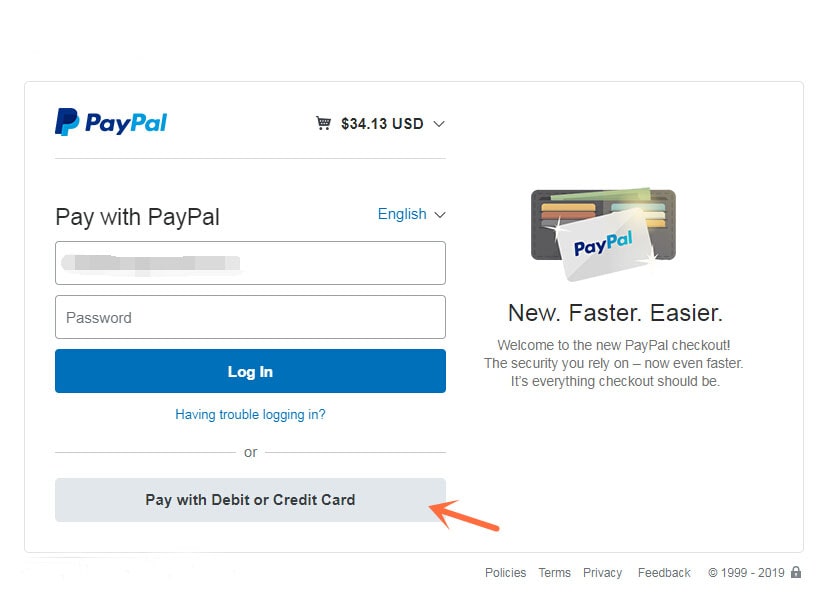
4. You will enter PayPal's website and please click the Pay with Debit or Credit Card.
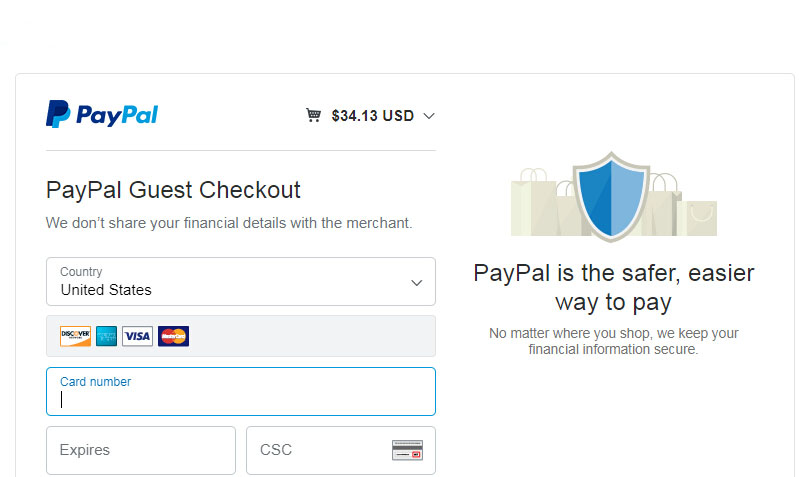
5. Select your credit card type: Visa, MasterCard, Discover, Visa Electron, DISCOVER, Diners Club INTERNATIONAL or JCB. Fill out the card information, Billing address, Contact Information and click Pay Now.
1. As with all credit card purchases, make sure you have enough available credit on your account before completing the transaction. Otherwise, your transaction could be declined and you'll have to find another payment method. And, if you haven’t used the credit card in a while, you also need to be sure it’s active.
2. Once you’re on the Checkout page, you’ll have to enter several pieces of information to complete the transaction. If your credit card processor isn’t listed in the box, it means that we cannot accept that type of credit card. You’ll have to use another payment.
3. Enter your credit card information: the credit card number, expiration date, and security code. For Visa, MasterCard, and Discover, the three-digit security code will be printed on the back of the card after the credit card number.

2. On the Checkout page (including information of Billing/Shipping Address, Shipping Method, Payment Method & Review Your Order), under Payment Method, select the Western Union option.
3. After checking the details of your order, click Place order now
| First Name | ## |
| Last Name | ## |
| Country | China |

2. On the Checkout page (including information of Billing/Shipping Address, Shipping Method, Payment Method & Review Your Order), under Payment Method, select the Bank Transfer (T/T) option.
3. After checking the details of your order, click Place order now
| Name | ####### |
| Account | ##### |
| Bank Name | HSBC Hong Kong |
| Swift Code | HSBCHKHHHKH |
| Bank Address | ###### |
